

Shoppable video integration is defined as embedding interactive product tags, pricing overlays, and add-to-cart buttons directly inside a video player so shoppers can purchase without leaving the viewing experience. This approach, also called video commerce, collapses the traditional funnel from awareness to checkout into a single touchpoint. Platforms like Shopify and WooCommerce now support native connections to video commerce solutions from vendors such as Bambuser, Firework, and Videowise, making the technology accessible to brands of every size. Shoppers viewing shoppable videos are 225% more likely to add items to cart than those who only see static product pages. That number alone explains why ecommerce teams are prioritizing this format in 2026.
What does shoppable video integration ecommerce actually require?
Before you can run a shoppable video on your product pages, three systems must work in concert: your video player, your live product catalog, and your cart or checkout service. Think of it like a pit crew. Each member has a distinct role, and if one is out of sync, the whole operation stalls. Keeping all three systems synchronized for SKU accuracy and real-time inventory is where most of the integration effort lives.
Your video assets can come from user-generated content, influencer shoots, or brand-produced footage. The format matters less than the tagging layer you build on top of it. You need a compatible ecommerce platform with a product catalog that exposes an API, a video hosting solution with CDN delivery, and an overlay engine that renders clickable hotspots on specific frames. AI tagging tools, now standard in platforms like Bambuser and Firework, automate much of the product identification work that used to require manual frame-by-frame annotation.

Here is a quick reference for the core components you need in place:
| Component | Function |
|---|---|
| Video hosting with CDN | Delivers video fast without degrading page load speed |
| Product catalog API | Supplies live pricing, inventory, and SKU data to overlays |
| Overlay or tagging engine | Renders clickable product hotspots on video frames |
| Cart integration layer | Passes selected variants to a unified checkout session |
| Analytics module | Tracks add-to-cart rate, completion rate, and click-through |
Pro Tip: Start with a single product page or a focused campaign rather than a sitewide rollout. One well-instrumented pilot gives you clean data and surfaces integration issues before they multiply across hundreds of pages.
How to choose the right shoppable video platform for your store
The platform decision shapes everything downstream, from your development timeline to your ongoing costs. SaaS platforms typically charge $299 to $1,200 monthly based on traffic and features, so matching capability to actual need prevents overspending on tools you will not use.
The leading options each have a distinct profile. Bambuser leads on live shopping and AI-driven structured data, including its GEO Discovery tool that adds schema markup and automated transcription for AI search visibility. Firework specializes in short-form video loops with performance-optimized embed scripts. Videowise focuses on omnichannel reuse, letting you deploy the same shoppable asset in Klaviyo email workflows and mobile marketplaces. Tolstoy excels at interactive branching video for guided selling. Each platform offers native Shopify or WooCommerce integration, but the depth of that integration varies.
When evaluating any platform, check these factors before signing a contract:
- Native Shopify or WooCommerce theme app block support to avoid costly remapping across page templates
- AI auto-tagging to reduce manual annotation time on large catalogs
- Social media import so you can repurpose existing TikTok or Instagram Reels content
- Lazy loading and lightweight embed scripts to protect Core Web Vitals scores
- Real-time inventory sync to prevent displaying out-of-stock variants as purchasable
Performance deserves special attention. Poorly implemented embeds can block the main thread for over 1.7 seconds, while well-architected ones show no measurable load time impact. That gap directly affects your Google rankings and your bounce rate.
Pro Tip: Run a Lighthouse audit on your product pages before integration and save the baseline scores. Run the same audit immediately after going live. Any regression in LCP or INP signals an embed script problem, not a content problem.
Step-by-step process to implement shoppable video on your site
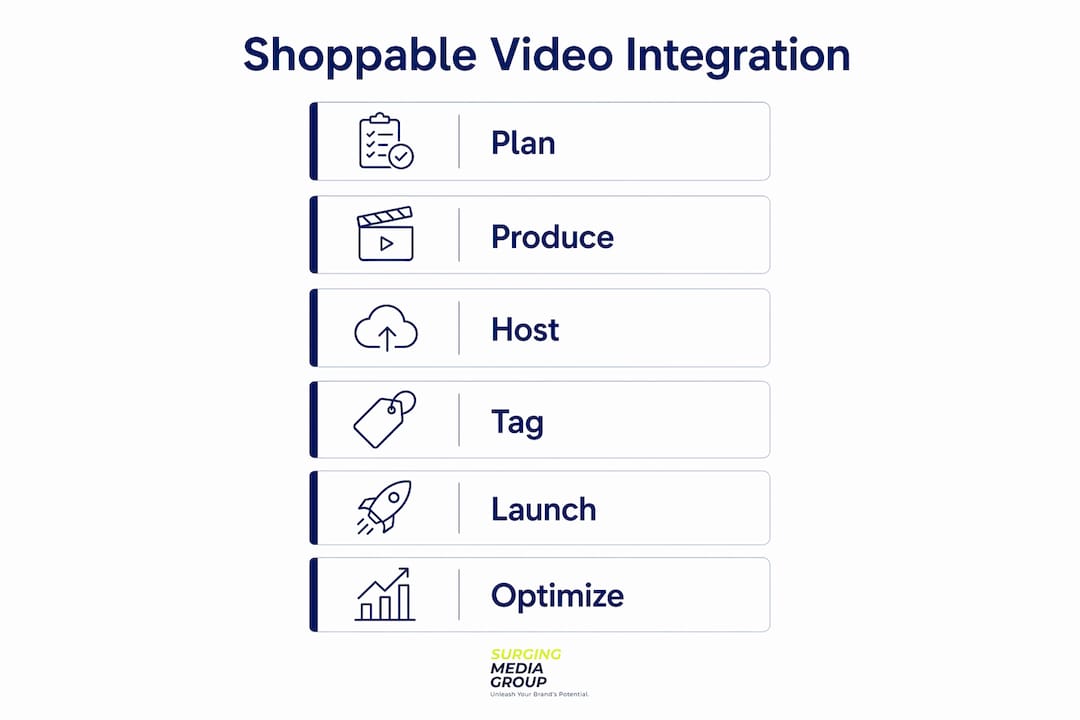
Implementation follows a predictable sequence. Rushing any step creates downstream problems that are expensive to fix, particularly around SKU mapping and cart synchronization.
-
Asset preparation. Source or produce video content that shows the product in use. Vertical formats perform best on mobile, while horizontal works for desktop-first product pages. Edit to under 90 seconds for shoppable overlays, since completion rates drop sharply beyond that threshold.
-
Platform setup. Install your chosen video player using the platform's official theme app block on Shopify, or the recommended plugin on WooCommerce. Connect the player to your product catalog by authorizing the API integration. Retaining linkage to Shopify's product catalog through supported theme app blocks prevents the remapping work that breaks integrations during theme updates.
-
Tagging. Add clickable hotspots to specific frames or time codes. Most platforms let you pin a product card to a moment in the video, so when a viewer sees a jacket at the 12-second mark, the tag appears precisely then. Include variant selectors (size, color) inside the overlay so shoppers never need to navigate to a separate product detail page.
-
Cart integration. Confirm that items added from the video feed into the same cart session as items added from standard product pages. Fragmented cart experiences, where the video creates a separate checkout flow, confuse shoppers and inflate abandonment rates. Preloading product data and validating against live inventory APIs prevents stale SKU displays that erode trust.
-
Testing and optimization. Test across devices, browsers, and connection speeds before launch. Verify that every tagged product resolves to the correct variant, that out-of-stock items display correctly, and that the add-to-cart action fires the right analytics event. Check that video is not the largest contentful paint element on the page, since that single factor often determines whether your LCP stays under 50ms.
Common pitfalls to avoid:
| Pitfall | Fix |
|---|---|
| Mismatched SKUs between video tags and live catalog | Preload product data and validate against storefront API before publish |
| Heavy synchronous embed scripts | Use async loading and keep script size under 50KB |
| Fragmented cart sessions | Confirm single-cart architecture with your platform's documentation |
| Missing variant selectors in overlay | Add size and color pickers directly inside the product card overlay |
Pro Tip: Coordinate your marketing and development teams on SKU mapping before tagging begins. A shared spreadsheet of product IDs, variant handles, and canonical URLs saves hours of rework and prevents the most common source of broken checkout flows.
How to optimize shoppable video performance after going live
Going live is the beginning, not the finish line. The brands that extract the most value from video commerce solutions treat post-launch optimization as a continuous discipline, not a one-time task.
Performance engineering comes first. Lazy loading combined with CDN hosting and lightweight embed scripts minimizes video's impact on page load speed and Core Web Vitals scores. The Intersection Observer API triggers video player loading only when the element enters the viewport, which means shoppers on slow connections never pay the cost of loading a video they never scroll to. Keep embed scripts under 50KB and avoid synchronous loading patterns that block critical rendering.
Mobile-first design is non-negotiable in 2026. Tap targets inside video overlays need to be large enough for touchscreen interaction, and vertical video formats outperform horizontal on smartphones. Connection-aware loading, where the player detects network speed and adjusts quality accordingly, reduces buffering abandonment on mobile networks.
Top optimization practices to run on a rolling basis:
- Monitor LCP, INP, and CLS using real user metrics from Google Search Console, not just lab data from Lighthouse
- Track add-to-cart rate, video completion rate, and click-through to product card as your primary engagement signals
- A/B test video placement (above the fold vs. mid-page) and format (looping short-form vs. full-length demo)
- Reuse shoppable assets across omnichannel marketing channels including email workflows, social ads, and mobile marketplaces to maximize production ROI
- Use structured data and taxonomy tagging to make video content discoverable by AI answer engines, extending reach beyond onsite search
Scaling from a pilot page to sitewide deployment requires a performance budget. Set a threshold, such as no more than 100ms added to LCP, and enforce it before approving new video placements. This prevents the gradual site-speed erosion that happens when teams add video embeds without a governing standard.
Pro Tip: Continuous A/B testing of video formats and placements compounds over time. A 15% lift in add-to-cart rate from a placement change on your top 10 product pages translates directly to revenue without any additional ad spend.
Key takeaways
Shoppable video integration succeeds when the video player, live product catalog, and cart service operate as a single synchronized system, not as three separate tools bolted together.
| Point | Details |
|---|---|
| Define the system first | Treat shoppable video as a synchronized architecture, not a UI feature added to existing video. |
| Choose platforms by performance | Evaluate embed script weight and lazy loading before committing to any vendor. |
| Tag with precision | Pin product overlays to specific time codes and include variant selectors inside the card. |
| Protect site speed | Keep embed scripts under 50KB and use Intersection Observer for viewport-triggered loading. |
| Measure what moves revenue | Track add-to-cart rate and video completion rate as primary KPIs, not view count alone. |
What I've learned from watching brands get this right and wrong
I have watched ecommerce teams treat shoppable video as a marketing project and hand it entirely to the content team. That approach almost always produces a beautiful video with a broken checkout. The integration is a product engineering problem as much as it is a creative one, and the brands that succeed align both disciplines from day one.
The SKU consistency issue is more common than most vendors admit. A product catalog that works perfectly for a standard product page can expose gaps the moment you try to pin a specific variant to a video frame. Color handles that differ between your catalog and your video platform's import, or size options that display in a different order, create friction that shoppers feel even if they cannot name it. Planning your taxonomy before you start tagging saves weeks of cleanup.
I am also genuinely excited about where AI-enhanced tagging is heading. Bambuser's GEO Discovery tool represents a shift I think most brands are underestimating. Structured data layers on video content mean your shoppable assets become discoverable by AI answer engines, not just by shoppers who already found your site. That is a meaningful expansion of reach that requires almost no additional production budget. The brands building that infrastructure now will have a compounding advantage as AI-driven commerce grows. Start small, instrument everything, and treat each pilot as a learning asset. The video content repurposing strategies you build into your workflow from the start will pay dividends across every channel you activate later.
— Sergio
How Surgingmedia helps ecommerce brands build shoppable video assets that convert
Surgingmedia produces video content built specifically for performance. Every asset we create is engineered for direct-response outcomes, which means the storytelling, pacing, and product presentation are all calibrated to drive action, not just views.
For ecommerce brands exploring shoppable video, we deliver production-ready assets optimized for overlay tagging, including vertical formats for mobile, short-form loops for product pages, and full-length demos for high-consideration purchases. Our work with brands like Copper Compression and Black & Decker demonstrates what purpose-built high-converting video content looks like in practice. If you are ready to move from concept to a live shoppable experience, reach out to Surgingmedia for a tailored production plan.
FAQ
What is shoppable video in ecommerce?
Shoppable video is a format that embeds clickable product data including pricing and add-to-cart buttons directly inside the video player, letting shoppers purchase without leaving the viewing experience. It reduces page transitions and shortens the path from discovery to checkout.
How much does shoppable video integration cost?
Platform costs typically range from $299 to $1,200 per month depending on traffic volume and feature set. Production costs for the video assets themselves vary based on format and complexity.
Does adding video slow down my ecommerce site?
It depends entirely on implementation. Well-architected embeds with lazy loading show no measurable load time impact, while poorly implemented scripts can block the main thread for over 1.7 seconds. Script weight and loading strategy matter more than video file size.
Which platforms support shoppable video for Shopify?
Bambuser, Firework, Videowise, and Tolstoy all offer native Shopify integrations. Each uses theme app blocks to connect directly to your product catalog without requiring custom development work.
What metrics should I track for shoppable video performance?
Track add-to-cart rate, video completion rate, and click-through to product card as your core engagement signals. View count alone does not indicate whether the integration is driving revenue.