

Most Amazon sellers know video matters. What they don't know is why their videos aren't working. Blurry footage, ignored uploads, rejected content, stagnant conversion rates — these are the symptoms of skipping the fundamentals. Understanding amazon product video best practices isn't just a technical exercise. It's the difference between a listing that captures attention and one that loses shoppers to the competitor one scroll away. This guide walks you through every stage, from understanding why video moves the needle to filming, uploading, and measuring what works.
Table of Contents
- Understanding the impact of Amazon product videos
- Preparing to create your Amazon product video assets
- Step-by-step guide to filming and producing Amazon product videos
- Optimizing and uploading videos to Amazon
- Measuring success and refining your Amazon video strategy
- The uncomfortable truths of Amazon product video creation
- How Surging Media Group can help you create high-converting Amazon videos
- Frequently asked questions
Key Takeaways
| Point | Details |
|---|---|
| Short & focused videos | Keep Amazon product videos between 20 and 30 seconds to quickly demonstrate product benefits and hold shopper attention. |
| Follow Amazon specs | Adhere strictly to Amazon’s technical requirements and content policies to avoid video rejection and ensure smooth uploads. |
| Show real use | Use authentic product demonstrations with good lighting and neutral backgrounds to build trust and clarity. |
| Plan multiple videos | Produce different video types per product—micro-demos, lifestyle, and FAQ—to address varied shopper needs. |
| Test and optimize | Track performance metrics like conversion rates and engagement to refine your video content continuously. |
Understanding the impact of Amazon product videos
Video does something static images simply cannot: it shows the product alive. A shopper watching a jacket's zipper glide smoothly, or seeing a blender crush ice in three seconds, gets information that no bullet point can fully communicate. That felt experience is what builds buying confidence. And visual content in marketing has consistently proven to reduce purchase hesitation across product categories.
Here's what makes this even more compelling from a ranking perspective: listings with video convert higher and earn better placement in Amazon's search results. Amazon's algorithm rewards engagement signals. When a shopper spends more time on your listing watching a video, that behavioral data feeds back into your organic ranking. Video isn't decoration — it's a ranking signal dressed as content.
Sellers who skip video are making a measurable sacrifice. Consider what you're missing:
- Higher click-through rates from video thumbnails that stand out in search results
- Longer time-on-page, which signals purchase intent to Amazon's algorithm
- Reduced return rates because shoppers understand what they're buying before it arrives
- Increased shopper trust, especially for new or unfamiliar brands competing against established names
"If a competitor has video on their listing and you don't, you are not just losing a feature — you are losing the moment where a shopper's doubt becomes certainty."
We've seen this play out with brands that invested early in video assets driving better performance across their ad accounts. The lift is real, and it compounds over time.
Preparing to create your Amazon product video assets
Before you film a single frame, you need the right access and the right plan. The most common mistake I see is sellers jumping into production without sorting the prerequisites first, which leads to wasted footage and upload errors.
Step one: Amazon Brand Registry. You cannot upload videos to your product detail page or A+ Content without it. Brand Registry enrollment is mandatory to unlock the video upload feature in Seller Central. This process requires a registered trademark, so if you haven't started that process, begin now.
Step two: Technical specifications. Amazon is specific, and failing these specs means rejection. Videos must meet technical specs including a 16:9 aspect ratio, MP4 or MOV format, and a minimum resolution of 1280x720 pixels.
| Specification | Requirement |
|---|---|
| File format | MP4 or MOV |
| Aspect ratio | 16:9 |
| Minimum resolution | 1280 x 720 px |
| Recommended resolution | 1920 x 1080 px |
| Maximum file size | 500 MB |
| Recommended length | 20 to 30 seconds |
Step three: Define your video goals before you film. Every video should answer one specific question a shopper has. Map your product's top features to the most common shopper objections or search queries. A fitness brand selling resistance bands, for example, might plan separate videos for "how to use," "resistance levels explained," and "durability under heavy use." Each video covers a distinct intent.

Pro Tip: Plan to film three to five short clips in a single production day. Each clip should focus on one feature and be ready for independent upload. This approach multiplies your listing's video coverage without multiplying your production budget.
Our video production services are built around exactly this kind of focused, efficient planning for Amazon sellers.
Step-by-step guide to filming and producing Amazon product videos
Great videos are built on structure, not spontaneity. The most effective approach I've found follows a three-part framework: hook, proof, and close. This mirrors how shoppers process information on a product page — they need to feel seen, then convinced, then shown the outcome.
A strong video structure looks like this:
- Hook (0 to 5 seconds): Open with the shopper's problem, not your product. Show someone struggling with a tangled garden hose, not the hose itself. Emotion first, product second.
- Product proof (5 to 25 seconds): Demonstrate the key feature clearly and without narration if possible. Use a 3-part video structure — hook, proof, and close — because it consistently outperforms narration-heavy approaches.
- Close (25 to 30 seconds): End on the transformation. Show the garden neatly watered, the person smiling, the problem gone. The "after" image is what the shopper is actually buying.
Practical filming guidelines:
- Film in a brightly lit, neutral environment — natural light near a window or a simple softbox setup works well
- Use a tripod, always. Handheld footage looks amateurish and signals low production quality
- Include a real person using the product when possible; this builds trust and relatability
- Film horizontally in 16:9 to meet Amazon's format requirements
- Shoot in high resolution (1080p minimum) so your footage holds clarity during compression
What to avoid:
- Burnt-in text overlays and slide-show style videos cause content rejection by Amazon moderation
- Excessive animations, flashy transitions, or motion graphics that distract from the product
- Watermarks, logos, competitor references, or promotional pricing claims
- Narration that carries all the meaning — assume your viewer has the sound off
Pro Tip: Test your video muted before uploading. If you can't follow the product's story without audio, your visuals aren't doing enough work. This is also critical for mobile shoppers, most of whom watch with the sound off.
Good visual storytelling is about making every frame informative. Each second of video is a word in your sales copy. Spend it wisely.
Optimizing and uploading videos to Amazon
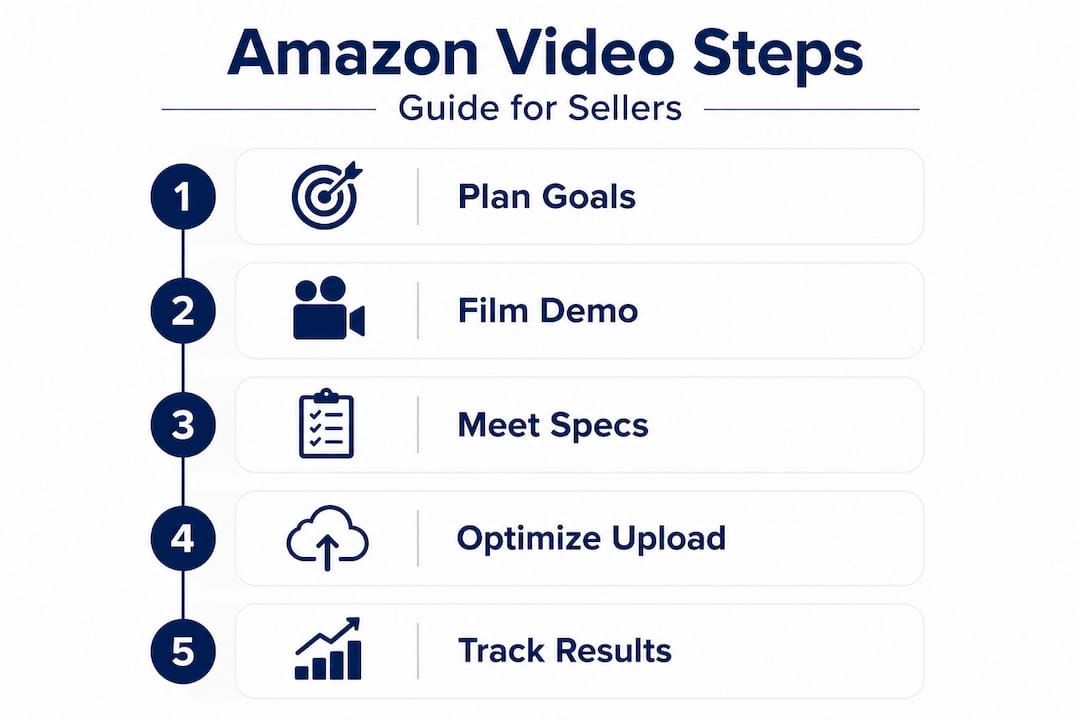
Uploading a video correctly is its own discipline. I've watched well-produced videos fail moderation simply because of filename errors or vague descriptions. Amazon's moderation team reviews every submission, and they are methodical.
Filename labeling matters more than most sellers realize. Proper filename labeling with ASIN and feature name is required for successful upload and moderation. Format your filenames like this: "ASIN_B09XYZ1234_waterproof_demo.mp4`. This tells Amazon exactly what to expect before they even watch the file.
Upload steps in Seller Central:
- Log into Seller Central and navigate to Inventory
- Select Upload & Manage Videos from the dropdown menu
- Click Upload Video and select your MP4 or MOV file
- Add a video title (15 characters maximum) that reflects the exact feature shown
- Add a description (55 characters maximum) that is accurate and specific
- Assign the video to the correct ASINs before submitting
Video titles and descriptions must reflect the exact product feature shown to avoid rejection during moderation. Vague titles like "Product video 1" are a red flag. Specific titles like "Waterproof seal demo" pass with far fewer issues.
Optimization factors to keep in mind:
| Factor | Best practice |
|---|---|
| Viewing environment | Optimize for mobile first; most shoppers watch on phones |
| Audio dependency | Videos should communicate value visually without sound |
| Video order | Upload multiple clips; Amazon may reorder them dynamically |
| Thumbnail selection | Choose a frame that shows the product clearly in action |
| Refresh cycle | Update videos seasonally or when product updates occur |
Pro Tip: Watch your listing on a mobile device after uploading. The experience on desktop and mobile differs significantly, and most purchase decisions happen on a phone. If your key feature isn't visible in the first three seconds on a small screen, reshoot or re-edit. Use video optimization tips to keep your content performing across placements.
Measuring success and refining your Amazon video strategy
Uploading and moving on is how good videos become forgotten assets. The sellers who gain long-term advantage from video are the ones who treat it as a living part of their strategy, not a one-time project.
Key metrics to track after video upload:
- Conversion rate before and after upload: This is your clearest signal. A meaningful lift within the first 30 days confirms the video is contributing to purchases.
- Average video watch time: Accessible through your A+ Content Manager dashboard. If shoppers are dropping off in the first three seconds, your hook isn't working.
- Return rate changes: Fewer returns often indicate that customers received exactly what the video showed them. This is an underused signal.
- Click-through rate (CTR): A video thumbnail in search results can lift CTR even before a shopper visits your listing.
Measure conversion rate lift, average view duration, and return rate to evaluate whether your video investment is generating real returns.
Testing video types reveals patterns that are invisible if you only upload one. A demo video might outperform a lifestyle video for a technical product. An FAQ-style video might work better for a product with many shopper questions. Run the comparison over four to six weeks with enough traffic to draw conclusions.
Pro Tip: Pull your keyword reports from Seller Central and cross-reference the search terms driving traffic against the features highlighted in your videos. If high-traffic keywords map to features you haven't filmed yet, that's your next production brief.
The uncomfortable truths of Amazon product video creation
Here's what experience teaches you that no spec sheet does: polish doesn't convert. I've reviewed videos that looked like television commercials but failed to move product. And I've seen shaky, natural-light clips filmed on a dining room table that outperformed them by 40 percent in conversion rate. The difference was always the same. The converting video showed the problem and the solution in the first five seconds. The expensive one opened with a logo animation.
Sellers often lose approval or performance by prioritizing narration and graphics over clear, immediate product proof. Amazon shoppers are not watching your video to be entertained. They are watching to answer one question: "Will this product fix my problem?" If your video spends ten seconds establishing brand identity before showing the product working, you've already lost them.
Authenticity is not a creative choice here; it's a conversion mechanism. Real hands. Real lighting. Real results. These video performance insights reflect a consistent pattern across categories and price points. The trust signal of watching a genuine product demonstration is worth more than any motion graphic.
The other hard truth is about scale. Most sellers create one video and call it done. But Amazon rewards multiple focused clips, each mapped to a specific feature or shopper question. A single shoot day, planned well, can produce five to seven distinct assets. That's the kind of content depth that earns listing authority over time. Plan the shoot like a strategist, not just a filmmaker.
How Surging Media Group can help you create high-converting Amazon videos
You now know what separates a video that drives purchases from one that sits on your listing unseen. Putting all of it into practice — scripting, filming, editing, compliance, optimization — takes expertise and discipline.
Surging Media Group specializes in producing Amazon-compliant product videos built around direct-response principles. From scripting your hook to delivering multiple short clips formatted to Amazon's exact specifications, the team handles every stage of production. The work is grounded in storytelling that sells, not just content that looks good. Explore the video asset marketing insights behind our approach and see how brands like Copper Compression and Black & Decker have used purpose-built video content to grow visibility and drive measurable sales.
Frequently asked questions
What is the ideal length for an Amazon product video?
Most effective videos are 20 to 30 seconds, keeping the content short, focused, and built around a single feature or benefit that answers the shopper's most pressing question.
Do I need to be in Amazon Brand Registry to upload videos?
Yes. Amazon Brand Registry access is required to publish video modules through A+ Content Manager and upload videos directly to your product detail pages.
Can I use animation in my Amazon product videos?
Animation should be minimal and purposeful. Real product demonstrations build more shopper trust than animated graphics, and overly animated videos are more likely to face moderation rejection.
Why are some Amazon videos rejected during moderation?
Overlay text, slideshows, and animated content are among the most common rejection triggers, along with blurry footage, mismatched titles, and descriptions that don't accurately reflect the feature shown in the video.